
PXLtools — Tool guide
Batch Renamer — rename hierarchies, fast
Rename a whole hierarchy in one pass. Batch Renamer composes new names from a prefix, base name and suffix, adds zero-padded sequential numbers, and does scene-wide find-and-replace — namespace-aware, undo-wrapped, deepest-child-first so nothing collides. For one object or a hundred, your naming convention applied consistently every time.
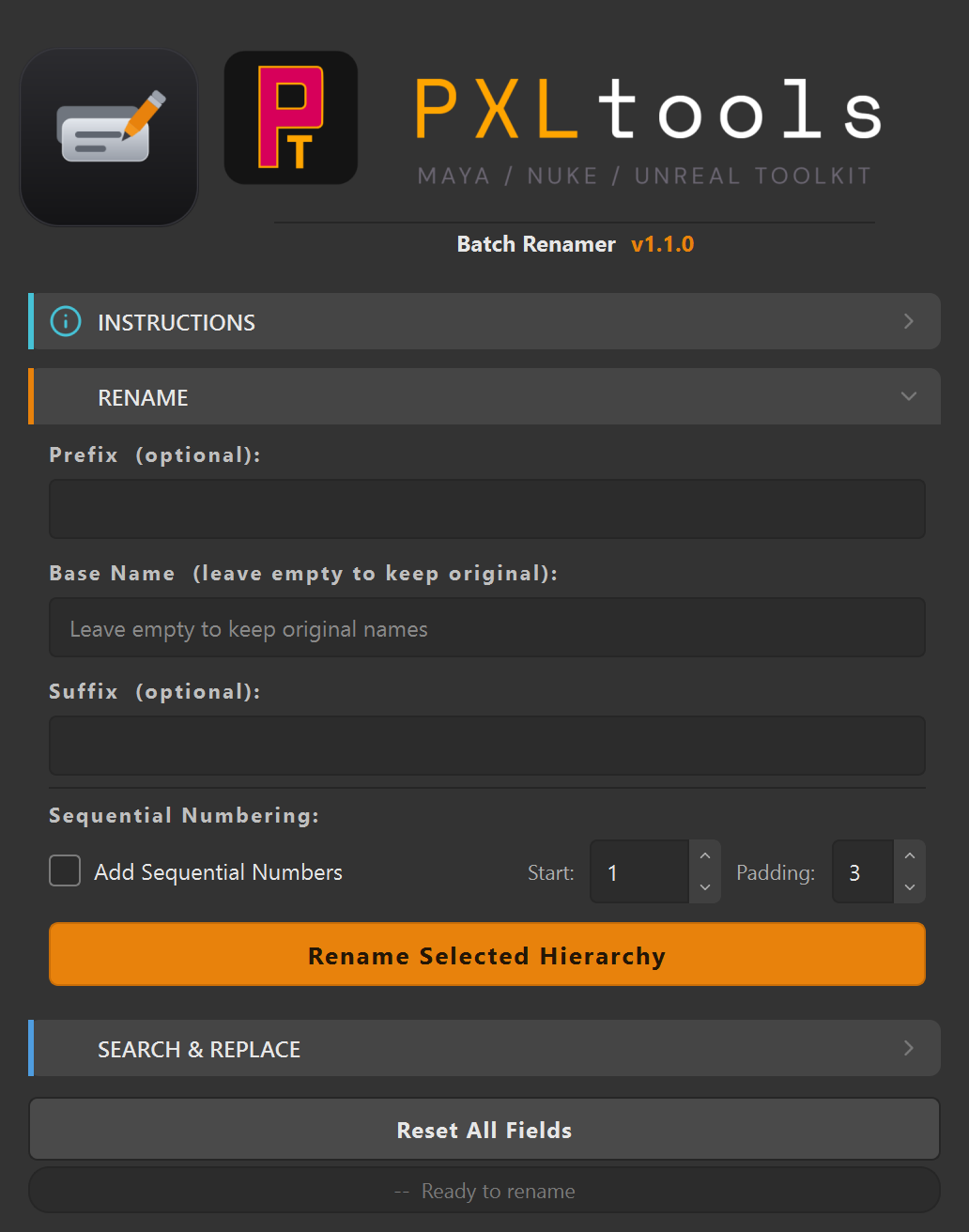
The interface
01
Overview
Batch Renamer renames a selected hierarchy in a single operation. It builds each new name from an optional prefix, a base name (or the original name kept as-is), and an optional suffix, then appends a zero-padded sequential number when you want one. A separate Search & Replace pass swaps text in existing names across the selection.
It is namespace-aware, wraps every change in an undo chunk, and renames deepest-child-first so parent renames never break the paths beneath them. It shares the same UI kit as the rest of PXLtools and auto-updates automatically on launch.
02
Requirements
- Autodesk Maya 2025
- Python 3
Tested on:
- Autodesk Maya 2025
Newer releases generally work, but these are the versions every release is actually tested against. If something behaves oddly on a newer host, that is worth reporting.
Network access
PXLtools needs outbound HTTPS (TCP 443) to www.pxlmentor.com and
objects.githubusercontent.com for licensing and updates. On a studio or corporate
machine, check this before you install — see
Troubleshooting.
Maya 2025 already includes PySide6. You do not install it, you do not pip anything, you do not touch your Python environment.
03
Availability
Batch Renamer is free on the PXLmentor store. Claim it there and you are emailed your licence key and a single INSTALL.py: drag that file into a Maya viewport (or paste the one line from the email into Nuke's Script Editor) and the toolkit installs itself, this tool included. Get it free on the store.
04
Using Batch Renamer
Two independent tools in one window: a RENAME composer and a SEARCH & REPLACE pass.
Rename a hierarchy
- Select objects in the scene. Pick the top of the hierarchy you want renamed.
- Compose the name. Fill any of
Prefix (optional),Base Name(leave empty to keep the original names), andSuffix (optional). The output order is prefix + base + suffix + number. - Add numbering (optional). Tick
Add Sequential Numbers, then setStart(default 1) andPadding(default 3, e.g. 001, 002…). - Rename. Press
Rename Selected Hierarchy. The status line confirms the result; the whole rename is a single undo step.
Search & replace
- Open the
SEARCH & REPLACEsection. - Enter the text to
Findand the text toReplace With. - Press
Search and Replaceto swap it across the selected names.
Tip: Reset All Fields clears everything back to defaults. Names are sanitised to valid Maya identifiers (non-alphanumeric characters become underscores), so you never end up with an illegal name.
05
Troubleshooting
The install fails, or the tool says it cannot reach pxlmentor.com.
This is a firewall almost every time, not a broken installer — and it is very common on studio and corporate machines. PXLtools needs outbound HTTPS on TCP 443 to two hosts:
Send this to your IT team
www.pxlmentor.com  (TCP 443) — licence checks, update checks, downloads
objects.githubusercontent.com  (TCP 443) — the actual file download
Both hosts, not just the first. The download is handed off to a signed link on
objects.githubusercontent.com, so a rule that allows pxlmentor.com but
blocks the second host lets the version check succeed and then fails the download.
A certificate error instead means your network is inspecting HTTPS traffic (Zscaler, Netskope, a corporate SSL appliance) — that needs an SSL-inspection exception for those hosts, not a port opening.
The installer writes full details to ~/Documents/PXLtools/install_failure.log. Email it to
support@pxlmentor.com
and I will tell you which case it is. If your IT will not budge, ask for the offline package.
Nothing renamed.
Select the objects in the scene first — Batch Renamer acts on the current selection (and its hierarchy).
My names came out with underscores I did not type.
Names are sanitised to valid Maya identifiers: spaces and other illegal characters are replaced with underscores so Maya accepts them.
A name could not start with a number.
Maya node names cannot begin with a digit. Add a prefix (or a base name) so the result starts with a letter; the tool warns and continues on the rest.
I want to undo a big rename.
Each rename pass is wrapped in a single undo chunk — one Ctrl+Z reverts the whole operation.